Key Takeaways:
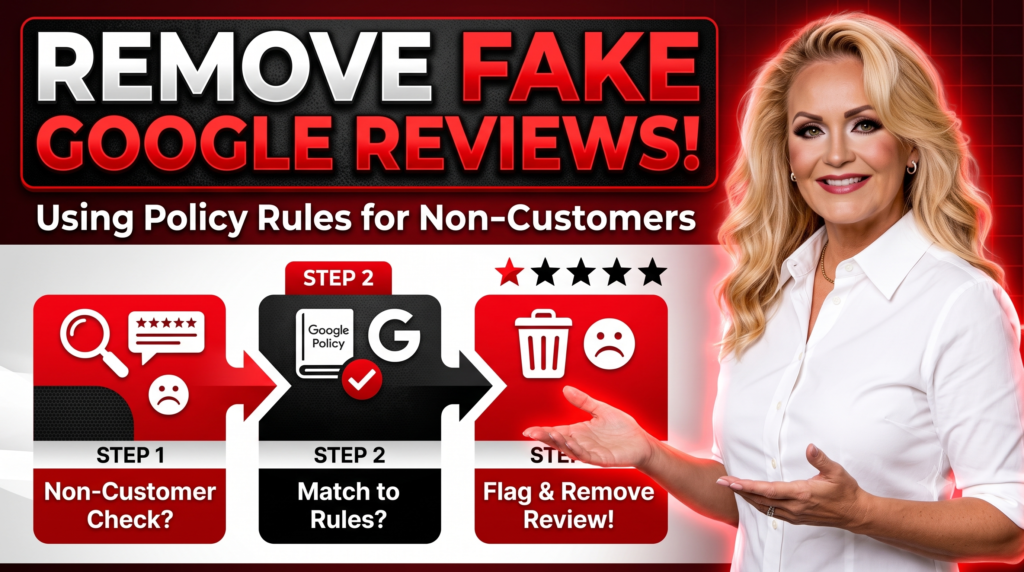
- Fake Reviews Directly Violate Google Policy: Google’s Maps User Contributed Content Policy explicitly bans “Fake Engagement”—meaning any review not based on a genuine, real-world customer experience must be removed.
- You Don’t Have to “Prove a Negative”: You cannot produce a receipt for someone who never bought anything; instead, you build a case by highlighting missing transaction records combined with algorithmic account anomalies.
- Reviewer Account Signals Tell the Story: Fake or non-customer reviews often stem from accounts with zero local review history, suspicious multi-location posting patterns, or hidden profile activity.
- Pay-Only-On-Success Review Removal: Protecting your profile carries zero financial risk when using specialized programs that remove policy-violating reviews across platforms with no payment due until the post is completely taken down.
Why Is a Total Stranger Allowed to Leave a 1-Star Review on Your Business Profile?
“221 million fake and misleading reviews were removed from Google Maps in a single year alone—and a huge portion of them came from people who never set foot inside the business.”
Over my decade running Business Solutions Marketing Group, I’ve had hundreds of frantic phone calls from business owners experiencing the exact same scenario. You log into your Google Business Profile on a Tuesday morning, only to find a scathing 1-star review from a name you’ve never heard of.
You check your CRM. Nothing. You check your appointment scheduling software, invoicing history, and email records. Nobody by that name has ever purchased a product, booked a service, or even filled out a contact form.
It feels completely unfair, doesn’t it? A complete stranger—or worse, a competitor using a burner account—can drop your rating overnight without ever doing business with you. But here is the good news: non-customer reviews are among the most removable content under Google’s official guidelines.
Let’s look at how Google defines this violation, how to spot the hidden account signals that prove a review is fake, and how we build airtight removal cases without getting stuck in the trap of trying to “prove a negative.”
What Does Google’s Official Policy Say About Reviews from Non-Customers?
Many business owners believe Google’s default stance is “if it’s posted on our platform, we won’t touch it unless it contains profanity.” That is a misconception.
According to Google’s Maps User Contributed Content Policy, content posted to Google Maps must reflect a genuine experience at a place or business. Under the explicit heading of Fake Engagement, Google states that reviews not based on a real experience or that do not accurately represent the location or product in question are strictly prohibited and subject to removal.
Furthermore, regulatory bodies like the Federal Trade Commission (FTC) have enacted stringent rules targeting fake reviews and deceptive consumer feedback, putting immense legal pressure on tech platforms to clean up unverified ratings.
When a stranger leaves a review for your business, they aren’t just giving an unfair opinion; they are violating Google’s core trust standards. The challenge isn’t whether the review violates policy—it’s proving that violation to an automated system or a human policy analyst.
How Do You Document the Absence of a Customer Relationship Without “Proving a Negative”?
When you report a review through your Google Business Profile dashboard, the most common frustration is receiving an automated response stating, “We reviewed the post and found no policy violation.”
Why does this happen? Because simply telling Google “I don’t know who this is” isn’t enough. You cannot produce a receipt or contract for someone who never transacted with you! Trying to prove a negative directly is a dead end.
Instead, you must build a circumstantial case based on structured verification data:
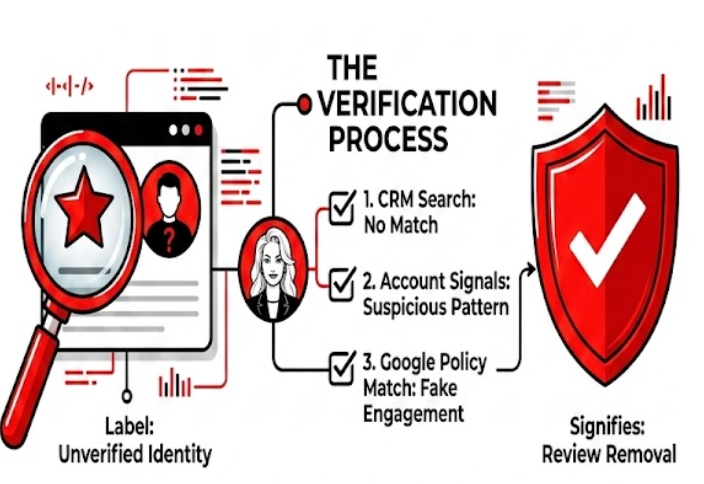
- Conduct a Multi-Database Audit: Search your Customer Relationship Management (CRM) platform, merchant gateway, point-of-sale (POS) records, signed agreements, and email logs. Document that zero variations of the reviewer’s name or public handles match any transaction history.
- Examine the Timeline and Specificity: Does the review describe services you don’t even offer? (e.g., complaining about “poor transmission repair” when you only do auto detailing). Discrepancies between your actual service catalog and the review text serve as strong evidence of off-topic or fake engagement.
- Draft a Fact-Based Owner Response (Carefully): Respond publicly to the review in a calm, professional manner: “We take all client feedback seriously, but we have no record of providing services to anyone under this name. Please contact our office directly so we can verify your visit.” This public statement establishes your good-faith attempt to verify the customer relationship.
What Reviewer Account Signals Indicate a Fake or Non-Customer Profile?
Google’s automated moderation systems evaluate account-level context to flag suspicious activity. When our team at Business Solutions Marketing Group audits a non-customer review, we look beyond the text and analyze the digital footprint of the reviewer’s Google account.
When a review comes from a non-customer or a fake burner account, it almost always leaves behind distinct behavioral footprints:
- Single-Review Accounts: The account was created recently, has a default profile photo, and has posted exactly one review—the 1-star hit on your profile.
- Geographic Impossibility: The reviewer leaves a 1-star review for your local plumbing company in Ohio, but clicking their profile reveals they left reviews for a dry cleaner in London, a restaurant in Sydney, and a car rental in Miami all within the same 48-hour window.
- Coordinated Review Spikes: The negative review arrived simultaneously with several other 1-star ratings across a 24-to-48 hour period, indicating a bot attack, a social media smear campaign, or a disgruntled former employee using multiple accounts.
- Private or Hidden Activity: Accounts designed purely for rating manipulation frequently hide their contribution history to obscure their patterns.
When we build a removal case, we combine these account-level anomalies with Google’s explicit policy rules. According to Google’s Content Trust & Safety Report, machine learning models actively analyze account history and cross-location activity to identify fraudulent reviews. Presenting these exact signals in a formal policy appeal dramatically increases the likelihood of a successful takedown.
How Does BSMG Remove Non-Customer Reviews Without Financial Risk?
Chasing Google support agents and navigating multi-step appeal forms can feel overwhelming when you’re trying to run a business. A single automated rejection often convinces business owners to give up and accept the score penalty.
At Business Solutions Marketing Group, we take a systematically different approach. We don’t just click “flag review.” We analyze the reviewer’s public profile signals, document the lack of customer history, cross-reference the text against Google’s Terms of Service, and escalate the case directly through official policy channels.
We believe in complete accountability, which is why we offer a specialized Review Removal Service across all major platforms.
Our policy is simple: You pay absolutely nothing until the non-compliant review is permanently removed according to Google’s Terms and Conditions.
There are no upfront retainers and no hidden costs. If we cannot successfully get the policy-violating review taken down, you don’t owe us a dime.
Actionable Steps to Handle a Non-Customer Review Today
If a stranger just left an unverified 1-star rating on your Google Business Profile, follow this step-by-step action plan to protect your online reputation:
- Do Not Panic or Argue Online: Avoid posting an angry, emotional response. Accusing the reviewer of lying or making personal attacks can harm your brand image and make policy escalation harder.
- Audit Your Internal Systems: Search your CRM, POS, and scheduling software for the reviewer’s name or any similar customer names around that date.
- Screenshot and Document the Profile: Capture screenshots of the review text, the reviewer’s public profile page, their total review count, and any other reviews they have written.
- Submit a Policy-Based Report: Log into your Google Business Profile manager, select the review, click “Report review,” and select Fake Engagement or Off-topic as the primary reason.
- Escalate to the Review Management Tool: If the initial automated flag is rejected within 3 days, utilize the official Google Business Profile Review Management Tool to submit a formal appeal detailing your account audit and lack of customer records.
- Partner with Experts: If standard appeals fail, let our team handle the legal and policy escalation through our risk-free removal program.
Frequently Asked Questions About Non-Customer Reviews
Can you really remove a Google review from someone who was never a customer?
Yes. Google’s official Maps User Contributed Content Policy strictly prohibits “Fake Engagement,” which covers any review not based on a genuine experience at the business. If you can demonstrate that the reviewer was never a customer and highlight suspicious profile signals, Google will remove the content.
- Primary Policy: Google Maps Fake Engagement Policy.
- Core Rule: All content must reflect a real-world customer experience.
- Removal Mechanism: Formal policy flagging and escalated appeal submissions.
What is the fastest way to get a fake Google review taken down?
The fastest method is flagging the review directly inside your Google Business Profile dashboard under the “Fake Engagement” policy category. If the automated system denies the request, escalating through the Google Business Profile Review Management Tool with specific evidence usually takes between 3 to 7 business days.
- Initial Flag: 24 to 48 hours for automated system scan.
- Secondary Escalation: 3 to 7 business days via the GBP Review Management Tool.
- Success Factor: Citing specific policy clauses rather than general complaints.
What if a competitor left a fake negative review using an anonymous name?
Competitor reviews constitute a direct “Conflict of Interest” and “Fake Engagement” under Google’s terms. You can challenge these reviews by pointing out profile creation dates, lack of local customer records, and overlapping posting patterns that indicate rating manipulation.
- Violation Type: Conflict of Interest & Rating Manipulation.
- Evidence Needed: Account anomaly data and CRM verification records.
- Policy Outcome: Permanent removal and potential restrictions on the offender.
Does Google penalize your business for flagging too many reviews?
No, reporting reviews that genuinely violate Google’s policy will not hurt your Business Profile standing. However, repeatedly reporting legitimate negative reviews from real customers simply because you disagree with their opinion can lead to rejected flags and wasted effort.
- Allowed: Reporting clear ToS violations, fake accounts, and spam.
- Not Allowed: Mass reporting authentic customer complaints.
- Best Practice: Reserve flagging for policy-violating posts.
What should I reply to a Google review from someone who wasn’t a customer?
Keep your public response professional, brief, and objective. State clearly that you have searched your client records and cannot locate any history of providing services to them, and invite them to reach out directly to clarify their identity.
- Tone: Calm, polite, and professional.
- Key Phrase: “We have no record of a customer by this name in our system.”
- Purpose: Demonstrates responsiveness to prospective clients viewing your profile.
How do I know if a reviewer profile is fake?
Fake reviewer profiles often exhibit clear anomalies, such as having only 1 total review, a brand-new account date, no local review geographic history, or leaving identical negative reviews for multiple businesses across different states within hours.
- Review Count: Single-review accounts with default avatars.
- Geographic Discrepancies: Reviews posted in widely separated locations rapidly.
- Text Patterns: Generic, vague complaints lacking specific details about your business.
Can I legally sue someone for leaving a fake Google review?
Yes, leaving a false review as a non-customer can constitute defamation (defamation per se or libel) and tortious interference with business relations. However, legal action is often costly and slow compared to utilizing Google’s internal policy removal channels.
- Legal Causes of Action: Defamation, libel, and tortious interference.
- Primary Drawback: High legal fees and difficulty identifying anonymous account holders.
- Recommended Alternative: Exhausting policy-backed administrative removal options first.
How does your pay-only-on-success review removal service work?
Our Review Removal Service evaluates non-customer and policy-violating reviews across Google, Yelp, and Facebook. We build formal legal and policy cases to escalate to platform teams, and you pay absolutely zero fees unless the review is completely removed.
- Cost: $0 upfront; no fee unless successful.
- Scope: Covers Google, Yelp, Facebook, and niche directories.
- Standard: Follows official platform Terms and Conditions.
Will deleting a fake review restore my original star rating immediately?
Yes. Once Google accepts a policy removal request and deletes the review, the star rating recalculates automatically within 24 hours, completely removing the negative score from your overall average.
- Calculation Window: Star ratings recalculate within 24 hours.
- Score Impact: All weight from the 1-star rating is permanently erased.
- Public Visibility: The text and rating disappear from Maps and Search results.
What happens if Google denies my initial flag request?
An initial denial usually comes from an automated filter. You can appeal the decision through the Google Business Profile Review Management Tool, where you can submit written context explaining the account anomalies and lack of customer records for human analyst review.
- Step 1: Access the GBP Appeals Tool.
- Step 2: Provide structured documentation citing Fake Engagement guidelines.
- Step 3: Partner with BSMG if manual appeals fail to get results.
About the Author
Linda Donnelly is the founder and owner of Business Solutions Marketing Group. With over a decade of hands-on experience helping small businesses scale through strategic marketing, Linda specializes in bridging the gap between traditional search visibility and cutting-edge generative AI optimization. As a longtime entrepreneur, she is passionate about building practical, automated systems that turn online reputation into predictable revenue.
GBP LInk – https://share.google/C8gU1JB3P6mPKWplN
LinkedIn – https://www.linkedin.com/company/business-solutions-marketing-group-llc/?viewAsMember=true
Instagram – https://www.instagram.com/business_solutions_mg/
Twitter – https://x.com/BSMGLLC
Facebook – https://www.facebook.com/BusinessSolutionsMarketingGroup
BlueSky: https://bsky.app/profile/bussolutions.bsky.social
TikTok – https://www.tiktok.com/@linda_donnelly
YouTube – https://www.youtube.com/channel/UC4w357-txvxOaHff2hTfSSg